 Treatstep
A busy week, and you're behind
A sick week or a crazy one goes by, the lessons kept moving without you, and now you wonder did I just undo everything? Treatstep waits: come back after missed days to a welcome back, with nothing to catch up on.
Treatstep tries 8 everyday skills with your dog, skips the ones it already does, and changes tomorrow's plan after every Not yet. For puppies, teens, adults and rescues.
Treatstep checks 8 everyday skills, skips what your dog already does, and builds today's plan: 2 to 4 short exercises, updated after every session. Built for puppies, teens, adults and rescues.
Your dog's plan comes first, before you pay. Then pick 1, 4 or 12 weeks, with every price and term shown before you enter a card. Cancel in one tap.

A sick week or a crazy one goes by, the lessons kept moving without you, and now you wonder did I just undo everything? Treatstep waits: come back after missed days to a welcome back, with nothing to catch up on.
You've got a leash, a pocket of treats and a wiggly puppy, and the screen wants you to read a wall of text. Every exercise is 4 short steps in big type with a photo, so one glance is enough.
Your dog is one dog with you and a different dog with your partner, and talking it through turns into an argument. One family link puts everyone on the same plan, with the same words and hand signs, and anyone can mark a session.
You were sold a "training guide" and found nothing to print and nothing to keep. Each dog's week prints on one page, ready for the fridge, and the sheet stays yours after you cancel.
Other apps follow the plan a quiz set once. Here, tomorrow changes with today.
 1
1In about 5 minutes, pick your dog's age, try 8 everyday skills together, and see what's already done.
 2
2Get 2 to 4 short exercises of 1 to 3 minutes each, with the steps, a clicker button and a timer.
 3
3Tap Got it, Halfway or Not yet after each exercise: Got it moves forward, Not yet comes back easier.
Real app screens, sample data.
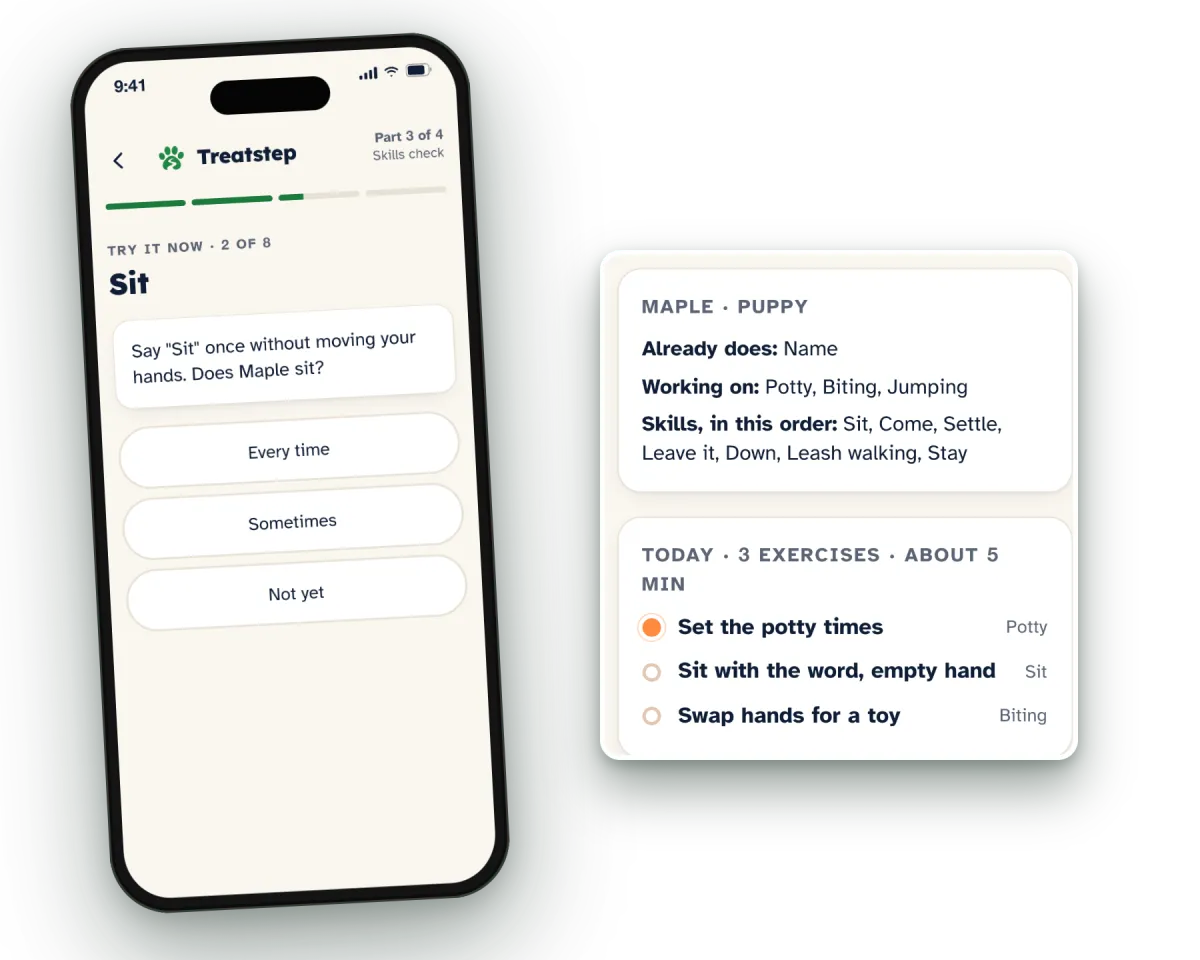
Before your first exercise, take about 5 minutes with your dog. Pick your dog's life stage, try 8 everyday skills, and tap Every time, Sometimes or Not yet for each. Then choose the problems to work on. Whatever your dog already does is skipped.
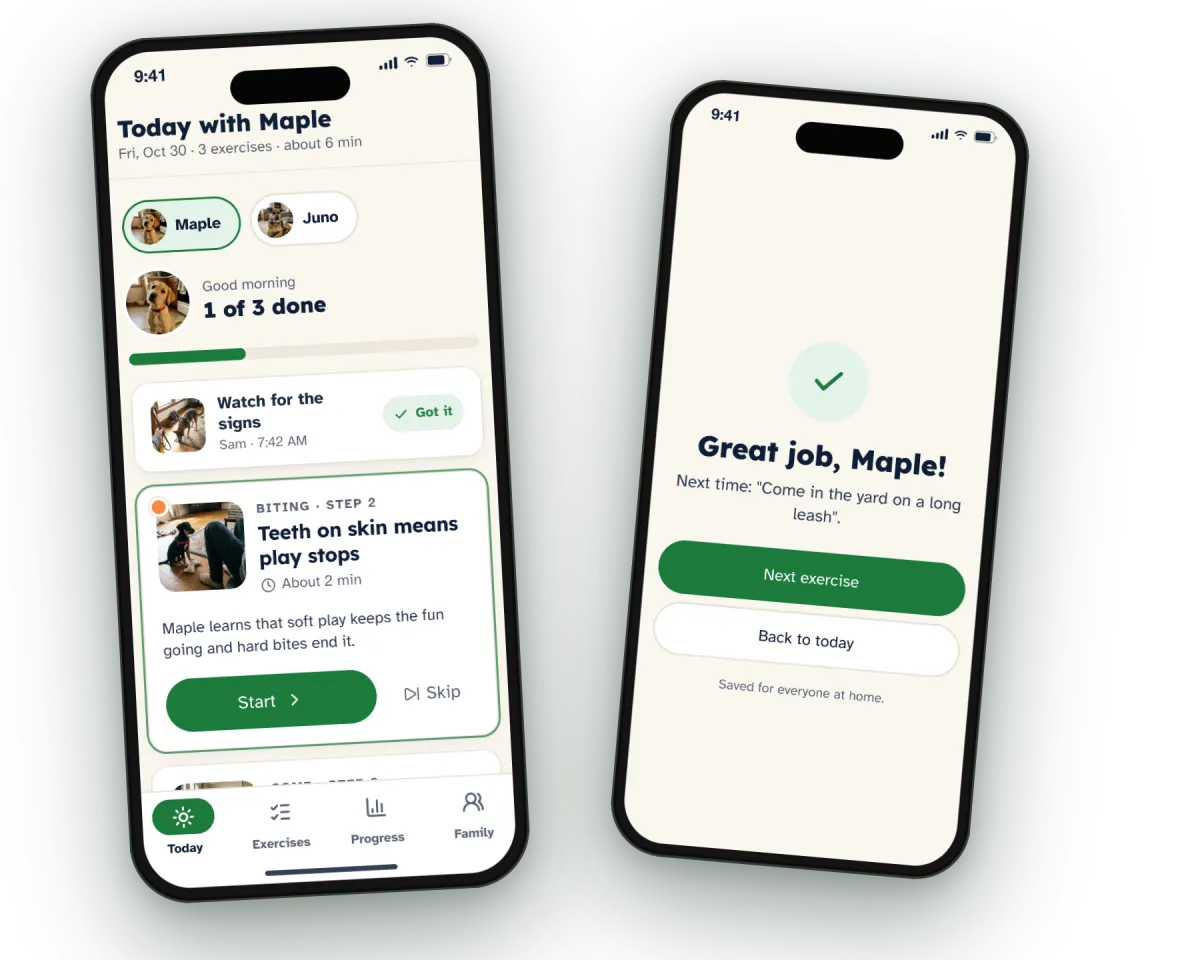
Every day you open one screen and see today: 2 to 4 short exercises picked for your dog. Want more? Do one more. Need it again? Repeat it. Not today? Skip it. You see progress for each skill and problem, and who trained.
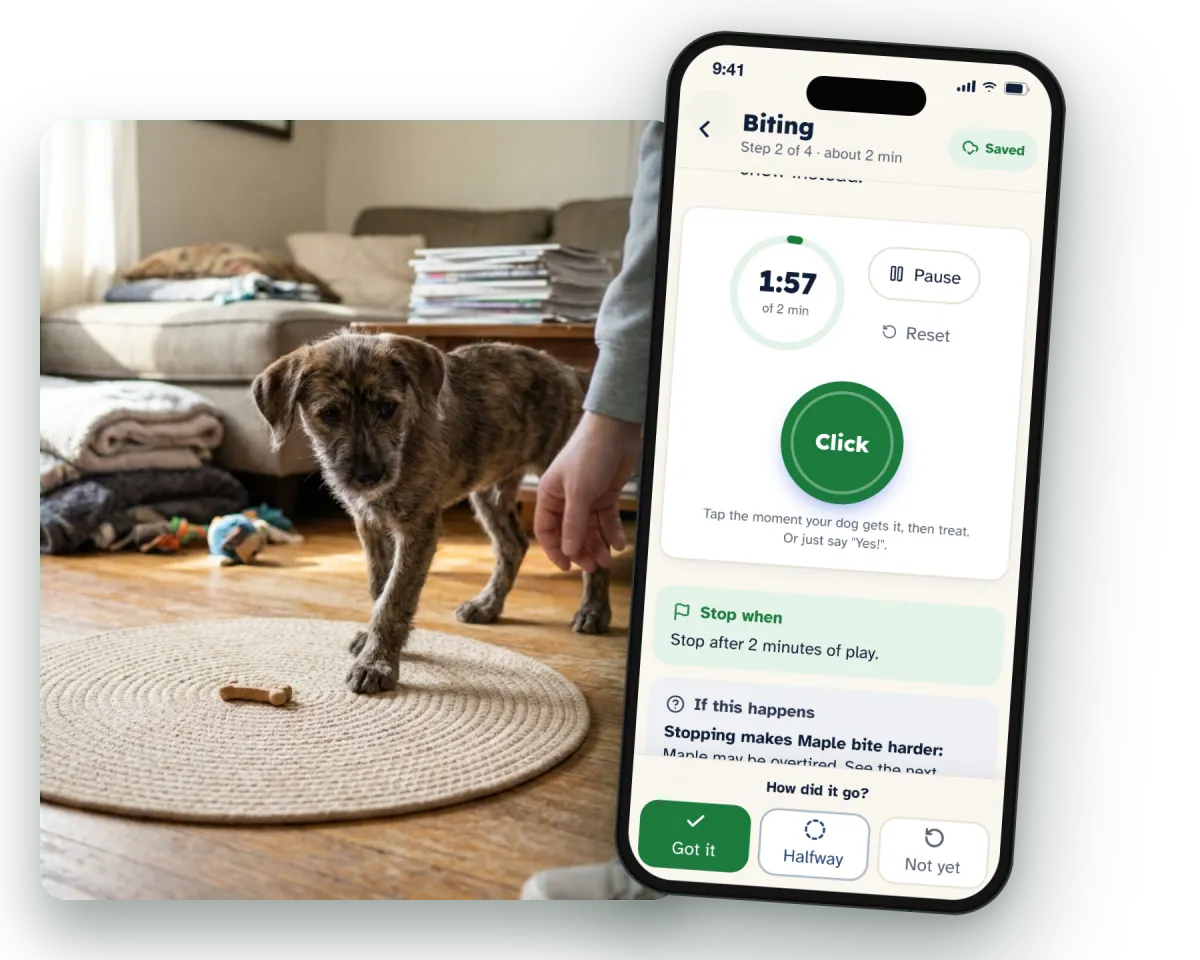
When your puppy is chewing your sleeve, there's no time to scroll. Open any exercise and you get what you need, the steps with a photo, when to stop, and an easier version. Tap the clicker button, or say "yes" the moment your dog gets it.
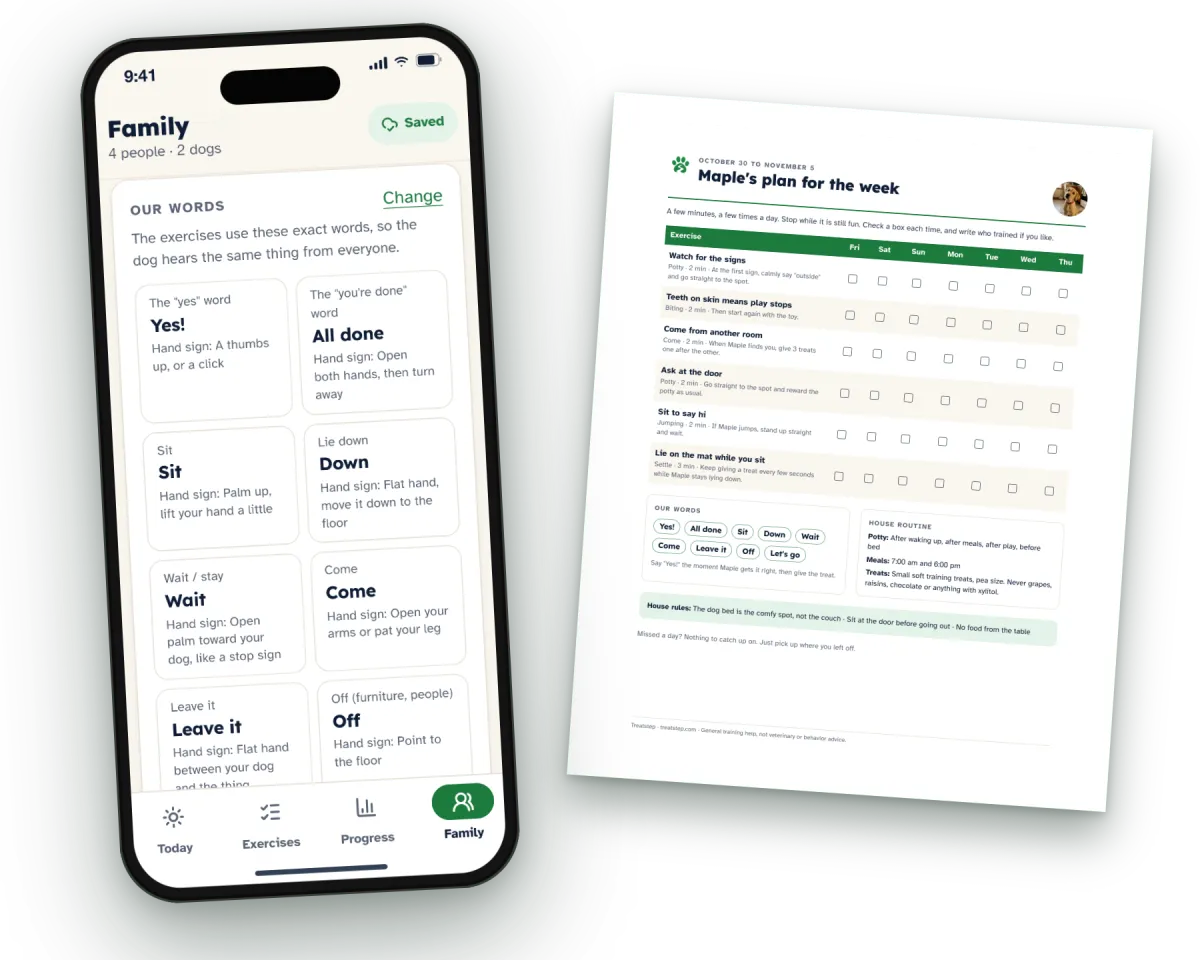
When the grandparents or the dog sitter take over for a weekend, nobody needs a long talk. They open the same family link, or read the week on the fridge. Every dog in the house gets its own Skills Check and its own plan.
Your dog's plan comes first, before you pay. Then pick 1, 4 or 12 weeks, with every price and term shown before you enter a card. Cancel in one tap.
Treatstep uses reward-based methods only: no shock, prong or choke collars. Before any plan, 4 safety questions ask about hard bites, guarding food or toys, panic when left alone, and a sudden change in behavior. A yes keeps that topic out of the plan, and inside the app Treatstep shows you who can help: a vet or a behavior professional. Treatstep is for training at home with the people who live with your dog. When it's more than training, it tells you so.

If you can hold a treat and tap a button, you can train with this.
Name, sit, down, stay, come, leave it, walk without pulling, settle.
Across the 9 problems you choose in the Skills Check.

16 printable pages: 75 everyday things to get used to for puppies of 8 to 16 weeks, a teen check-in, and a plan for a rescue's first 30 days. With every membership.

One card per dog plus a house rules page: your family's words and hand signs, the "yes" word, meal and potty times. Print it for the fridge and the dog sitter. With every membership.
Every membership includes The Skills Check · Today's Plan · The Exercise Library with Clicker & Timer · Family Sharing, Multi-Dog & Fridge Plan · The Socialization & Settling Checklist (16 pages) · The Family Word Card. Every dog and everyone at home, on one account.
30-Day Practice Guarantee: train with your plan on at least 7 different days in your first 30, and if it isn't helping, ask in Account and we refund everything you paid in those 30 days.

No. The Skills Check tries 8 everyday skills with your dog and skips what it already does. After that, the plan changes with every session. Start the Skills Check and see what gets skipped for yours.
Nothing during the Skills Check. The amounts sit in the app next to the pay button, with the renewal and the date of the first full-price charge, so you read every number before you choose. The steps are in How access works, above.
Videos give you tips. Treatstep gives you the order: which exercises today, for how long, and the next step after a Not yet, with everyone at home on the same words. See your dog's plan before you decide.
Yes. Treatstep covers 3 life stages: puppy (8 weeks to 5 months), teen (5 to 18 months), and adult or rescue. Your dog starts from the skills it already has. Pick your dog's age on the first screen of the Skills Check.
Each exercise takes 1 to 3 minutes, with 2 to 4 in a day's plan. Do one more, repeat one, or skip one. The Skills Check itself takes about 5 minutes, and you can start it now.
Treatstep uses reward-based methods only and asks 4 safety questions before any plan. If something needs a vet or a behavior professional, it tells you and leaves that topic out. The full method is in How we train, above.
30-Day Practice Guarantee: train with your plan on at least 7 different days in your first 30, and if it isn't helping, ask in Account and we refund everything you paid in those 30 days. A day trained is any day with at least one exercise marked in the app, by anyone at home. No screenshots, no videos.
In one tap in Account. A reminder email comes before your first full-price renewal, and the fridge sheet you printed stays yours. Questions? Write to info@treatstep.com.
A phone, tablet or computer with a browser. Nothing to install, you sign in with a link sent to your email, and it works offline at the park. Every exercise lists what you need before you start.
Treatstep works out today's order and dose, and you get to train your dog.
Your dog's plan comes first, before you pay. Then pick 1, 4 or 12 weeks, with every price and term shown before you enter a card. Cancel in one tap.